View your plan and usage
/billing shows your current plan, this month’s usage, and the rolling history.
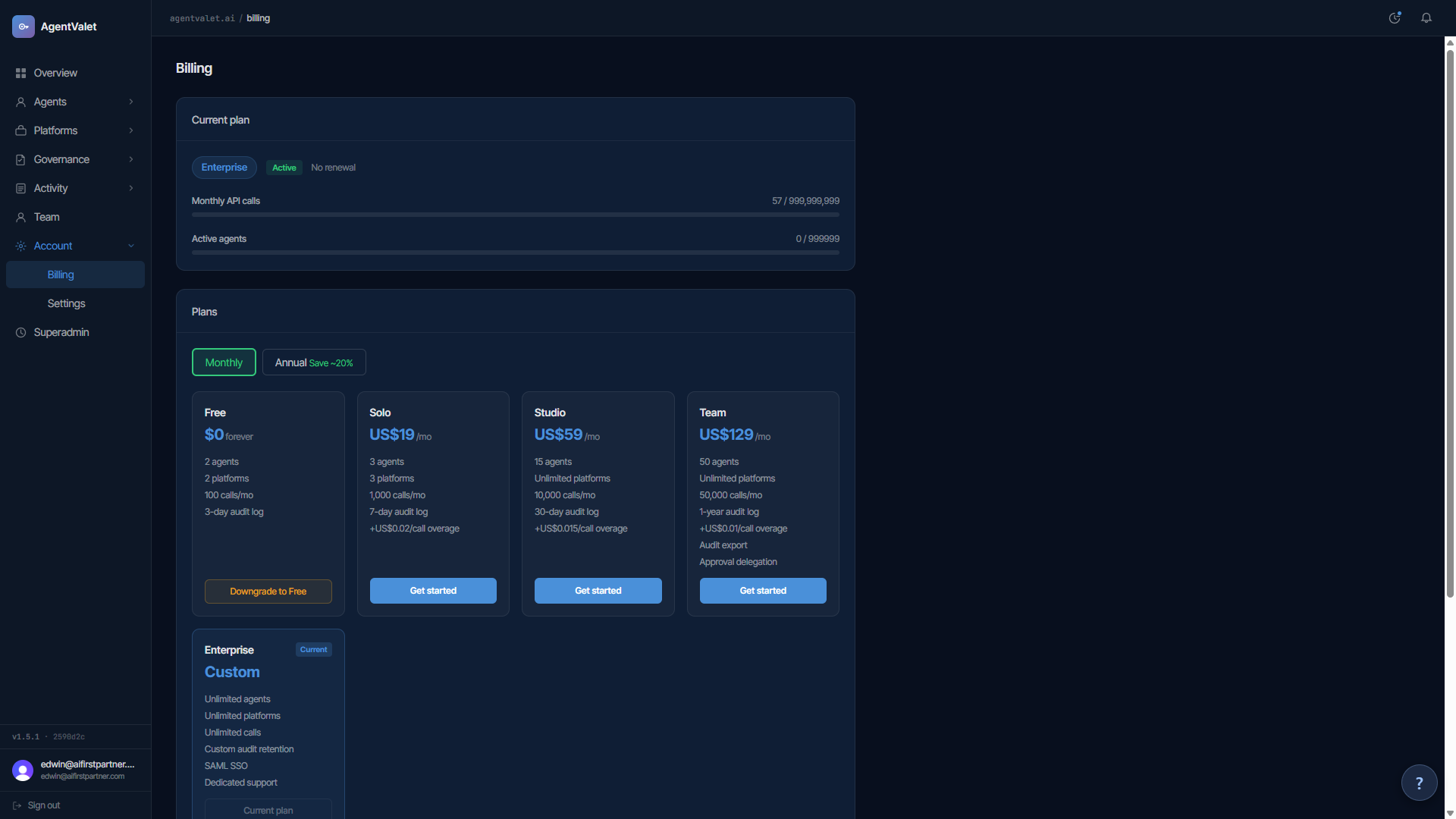
Page sections
Current plan
- Plan badge — your plan’s display name (
Free,Solo,Studio,TeamorEnterprise) and a status badge (active/past due/cancelled) - Renewal text — “Renews
{date}” or “No renewal” if you’re on Free or cancelled
Monthly API calls
Progress bar with {used} / {limit} next to it.
- Below 70% — green
- 70–89% — amber. From 75% a dismissible banner appears: “You’ve used 75% of your
{Plan}calls this month.” - 90%+ — red, banner: “90% of your included calls used.”
- Over 100% (paid plans) — red, overage banner: “You’re in overage —
{N}calls beyond limit. Estimated US${amount}on next invoice.” - Over 100% (Free) — your agents keep calling; only registering a new agent or connecting a new platform returns 402 until next month. See Understanding overage
Active agents
How many agents were active this month. Agents aren’t capped on any plan, so this is for information only; it never blocks anything or triggers overage.
Money-back guarantee callout
If you’re within 30 days of subscribing:
“30-day money-back guarantee — expires
{date}({days}days remaining). Request a refund →”
See Request a refund.
Plans grid
Below the current plan: every available plan as a card.
- Plan name, monthly price (or annual price if you’ve toggled “Annual Save ~20%”)
- Limits: agents (unlimited on every plan), platforms, governed actions/month, audit log window
- Extras: overage rate (paid only), Audit export and Approval delegation (Team)
Each card’s CTA:
- Get started (blue) — on every other paid plan. From Free it opens Stripe Checkout; from a paid plan it switches your subscription in place. See Upgrade your plan
- Current plan (disabled) — for your active plan
- Downgrade to Free — tells you to cancel via Manage billing
Payment method
Visible if you’ve ever been billed.
“Manage your subscription, payment method, and invoices in the Stripe billing portal.”
Click Manage billing → to open the Stripe billing portal.
Usage history
12-month rollup table:
- Month
- Calls
- Agents active
Empty state: “No usage data yet.”
Where the numbers come from
- Monthly call count — incremented only when a governed call actually executes. Denied, queued-for-approval and blocked calls don’t count
- Active agent count — from this month’s usage rollup
- Estimated overage — your overage calls this cycle × your plan’s overage rate
The display refreshes when you load the page; there’s no auto-refresh.